<?xml version="1.0" encoding="utf-8"?><feed xmlns="http://www.w3.org/2005/Atom" xml:lang="en"><generator uri="https://jekyllrb.com/" version="4.4.1">Jekyll</generator><link href="https://mfcabrera.com/feed.xml" rel="self" type="application/atom+xml"/><link href="https://mfcabrera.com/" rel="alternate" type="text/html" hreflang="en"/><updated>2026-05-07T18:03:17+00:00</updated><id>https://mfcabrera.com/feed.xml</id><title type="html">Miguel Cabrera’s Blog</title><subtitle>Technical insights on data science, machine learning, and software engineering. </subtitle><entry><title type="html">Databricks Berlin User Group: A Recap and a Surprise</title><link href="https://mfcabrera.com/blog/2026/databricks-berlin-user-group-recap/" rel="alternate" type="text/html" title="Databricks Berlin User Group: A Recap and a Surprise"/><published>2026-04-29T09:00:00+00:00</published><updated>2026-04-29T09:00:00+00:00</updated><id>https://mfcabrera.com/blog/2026/databricks-berlin-user-group-recap</id><content type="html" xml:base="https://mfcabrera.com/blog/2026/databricks-berlin-user-group-recap/"><![CDATA[<p>Last week I gave my first technical talk in years at the Databricks Berlin User Group. I want to write down a few things while they are still fresh, because they were not what I expected.</p> <h2 id="the-talk">The talk</h2> <figure class="rb-figure-img"> <img src="/assets/img/posts/databricks-ug-berlin-2026-04-28.jpg" alt="Miguel presenting the &quot;Eight patterns you can steal&quot; takeaway slide at the Databricks Berlin User Group, April 28 2026." loading="lazy"/> <figcaption>Databricks UG Berlin · 2026-04-28 · The takeaway slide</figcaption> </figure> <p>The premise: at <a href="https://www.platoapp.ai/">Plato</a> we ship 25+ ML algorithms across 50+ wholesale-distributor tenants, and we do it without hand-rolling deployments. The plumbing under that is <a href="https://docs.databricks.com/aws/en/dev-tools/bundles/"><strong>Databricks Asset Bundles</strong></a> (recently rebranded to <strong>Declarative Automation Bundles</strong>, or DABs) plus a small generator we wrote called <code class="language-plaintext highlighter-rouge">dabgen</code>, plus a <a href="https://www.claude.com/product/claude-code">Claude Code</a> <a href="https://www.claude.com/news/skills">skill</a> that drives the onboarding end-to-end.</p> <p>Title was “From Days to Minutes: How We Taught an AI to Onboard 50+ Tenants on our AI Features.” Slides are <a href="https://speakerdeck.com/mfcabrera/from-days-to-minutes-how-we-taught-an-ai-to-onboard-50-plus-tenants-on-our-ai-features">on Speaker Deck</a>.</p> <p>It went well. The food was great. The conversations after were better.</p> <h2 id="the-surprise">The surprise</h2> <p>I had built the talk assuming most of the room was already using DABs in production, and most engineers in the room were using AI coding assistants daily. The whole framing was “advanced workflow tricks.” Stuff like: how to layer overrides cleanly, where to draw the line between <a href="https://jinja.palletsprojects.com/">Jinja</a> templates and runtime config, what a CI/CD pipeline looks like when an AI is the one writing your tenant configs.</p> <p>Turns out fewer people than I thought were actually using DABs in production. Same story with the AI coding wave (Claude Code, <a href="https://openai.com/codex/">Codex</a>, <a href="https://cursor.com/">Cursor</a>, the whole stack). I was talking like these were table stakes. They are not, yet.</p> <p>That changed how I read my own talk afterwards. For a lot of the audience, the value was not in the specific tricks. It was in <span class="rb-pull">seeing that this stuff is real, and that small teams are running it, and that the resulting workflow is calmer than the one they have today</span>. Good signal for the next version of the talk. Less “here is the advanced pattern,” more “here is what a working setup actually looks like, and why the boring parts matter.”</p> <h2 id="two-questions-worth-writing-down">Two questions worth writing down</h2> <p>Two of the questions during Q&amp;A are still in my head, because the answers are the kind of thing I had not bothered to articulate before someone asked.</p> <p><strong>“Why skills and not just scripts?”</strong> This came up because half of what a skill ends up doing is “run a thing, parse the output, decide what to do next.” Which is what scripts do. So why the indirection?</p> <p>The honest answer is that a script encodes one path. A skill encodes a <em>capability</em>: the description, the inputs it expects, the failure modes it knows about, the tools it composes. When something goes sideways (and at 50 tenants, something is always going sideways), a script gives up at the first unhandled case. A skill negotiates: it tries an alternate path, asks the operator for a confirmation, drops back to a fallback tool. The five-tier scaffolding around the skill is what makes that negotiation actually go somewhere instead of into a loop.</p> <p>The TL;DR I gave at the meetup: scripts are great when the world is fixed. Skills earn their keep when the world is messy and you want the agent to keep going. (More on this in a follow-up.)</p> <p><strong>“MCP server or CLI tool?”</strong> This one I have a strong opinion on. I prefer CLIs.</p> <p>Two reasons. First, every <a href="https://modelcontextprotocol.io/">MCP</a> roundtrip is tokens. Tool definitions, schemas, the wrapper boilerplate. It adds up fast on long tasks, and on a tenant onboarding the agent is spending most of its budget on glue, not on actually thinking about your problem. A <code class="language-plaintext highlighter-rouge">python query_databricks.py "..."</code> call is one tool invocation, one stdout, done. Specifically the <a href="https://docs.databricks.com/aws/en/generative-ai/mcp/">Databricks SQL MCP</a> is the one we kept reaching for, and the one a small <code class="language-plaintext highlighter-rouge">query_databricks.py</code> script replaces nicely. Second, CLIs degrade better. When the hosted MCP service has a hiccup mid-flow (which has happened to us in production), the agent that <em>also</em> knows how to invoke the local CLI finishes the job. The one that only knows the MCP gets stuck. So our preference is: build the CLI first, expose it as an MCP later if it earns the convenience tax.</p> <p>I want to write up the MCP-vs-CLI argument properly, because it cuts against the default advice you’ll see, and it has cost-and-reliability evidence behind it. That’s on the queue.</p> <h2 id="the-personal-part">The personal part</h2> <p>This was my first talk since before corona. Five-ish years of public-speaking rust. I had forgotten how much I miss the feeling of a real audience asking real questions, instead of typing into a void on LinkedIn.</p> <h2 id="whats-next">What’s next</h2> <p>I am going to expand a few of the bits I had to cut from the slides into separate posts. The current shortlist:</p> <ol> <li><strong>Knowledge scaffolding for AI agents.</strong> The five-tier pattern (data model → CLAUDE.md → rules → skills → tools) we use to make a coding agent productive in a real production codebase. This is the most stealable idea from the talk and the one I get the most questions about.</li> <li><strong>Generator of generators.</strong> What <code class="language-plaintext highlighter-rouge">dabgen</code> actually does, and why “the same Jinja template renders the bundle template <em>and</em> the bundle” turned out to be the right design.</li> <li><strong>MCP vs CLI: a token and reliability argument.</strong> The longer version of the answer above. Why we default to CLIs, when MCP is worth the cost, and what we measured.</li> <li><strong>Tool-teaching beats prompt-engineering.</strong> When a hosted MCP drops mid-flow, the agent that <em>also</em> knows how to call your fallback Python script will finish the job. The one that just had a great prompt will not.</li> </ol> <p>If you run a Databricks or AI engineering event in Europe and want a longer version of any of this, you can find me on <a href="https://linkedin.com/in/mfcabrera">LinkedIn</a>.</p> <h2 id="the-slides">The slides</h2> <figure class="rb-figure-embed"> <iframe src="https://speakerdeck.com/player/a1680508de374e3e97deb09810eeb370" title="From Days to Minutes - slides" allow="fullscreen" loading="lazy" frameborder="0" allowtransparency="true"></iframe> <figcaption>From Days to Minutes · Databricks UG Berlin · April 2026</figcaption> </figure>]]></content><author><name></name></author><category term="talks"/><category term="databricks"/><category term="dabs"/><category term="ai_coding"/><category term="plato"/><category term="berlin"/><category term="community"/><summary type="html"><![CDATA[Notes from my first talk in five years, what surprised me about the room, and what I want to say next.]]></summary></entry><entry><title type="html">Data Verification for Machine Learning - A Review of DataFrame Validation Libraries</title><link href="https://mfcabrera.com/blog/2021/dataframe-validation-libraries/" rel="alternate" type="text/html" title="Data Verification for Machine Learning - A Review of DataFrame Validation Libraries"/><published>2021-10-21T07:27:47+00:00</published><updated>2021-10-21T07:27:47+00:00</updated><id>https://mfcabrera.com/blog/2021/dataframe-validation-libraries</id><content type="html" xml:base="https://mfcabrera.com/blog/2021/dataframe-validation-libraries/"><![CDATA[<h2 id="tldr">TL;DR</h2> <p>In this blog post, I review some interesting libraries for checking the quality of the data using Pandas and Spark data frames (and similar implementations). This is not a tutorial (I was actually trying out some of the tools while I wrote) but rather a review of sorts, so expect to find some opinions along the way.</p> <h2 id="intro---why-data-quality">Intro - Why Data Quality?</h2> <p>Data quality might be one of the areas Data scientists tend to overlook the most. Why? Well, let’s face it, It is boring and most of the time it is cumbersome to perform data validation. Furthermore, sometimes you do not know if your effort is going to pay off. Luckily, some libraries can help with this laborious task and standardize the process in a Data Science team or even across an organization.</p> <p>But first things first. Why I would choose to spend my time doing data quality checks, while I can spend my time writing some amazing code that trains a bleeding-edge deep convolutional logistic regression? Here are a couple of reasons:</p> <ul> <li> <p>It is hard to ensure data constraints in the source system. Particularly true for legacy systems.</p> </li> <li> <p>Companies rely on data to guide business decisions (forecasting, buying decisions), and missing or incorrect data affect those decisions.</p> </li> <li> <p>The trend to feed ML systems with this data (these systems are often highly sensitive to input data as the deployed model relies on the assumption on the characteristics of the inputs).</p> </li> <li> <p>Subtle errors introduced by changes in the data can be <strong>hard</strong> to detect.</p> </li> </ul> <h2 id="data-quality-dimensions">Data Quality Dimensions</h2> <p>The quality of the data can refer to the <strong>extension</strong> of the data (data values) or to the <strong>intension</strong> (not a typo) of the data (schema).</p> <h3 id="extension-dimension">Extension Dimension</h3> <p>Extracted from Schelter et al. (2018):</p> <ul> <li><strong>Completeness:</strong> The degree on which an entity includes data required to describe a real-world object. Presence of null values (missing values). Depends on context.</li> </ul> <p><strong>Example</strong>: Notebooks might not have the <code class="language-plaintext highlighter-rouge">shirt_size</code> property.</p> <ul> <li><strong>Consistency:</strong> The degree to which a set of semantic rules are violated. <ul> <li>Valid range of values (e.g. sizes <code class="language-plaintext highlighter-rouge">{S, M, L}</code>)</li> <li>There might be <em>intra-relation constraint</em>, e.g. if the category is “shoes” then the sizes should be in the range 30-50.</li> <li><em>Inter-relation</em> constraints may involve multiple tables and columns. <code class="language-plaintext highlighter-rouge">product_id</code> may only contain entries from the <code class="language-plaintext highlighter-rouge">product</code> table.</li> </ul> </li> <li><strong>Accuracy:</strong> The correctness of the data and can be measured in two ways, semantic and syntactic. <ul> <li><strong>Syntactic:</strong> Compares the representation of a value with a corresponding definition domain.</li> <li><strong>Semantic:</strong> Compares a value with its real world representation.</li> </ul> </li> </ul> <p><strong>Example</strong>: <em>blue</em> is a syntactically valid value for the column <em>color</em> (even if a product is of color red). <em>XL</em> would neither semantically nor syntactically accurate.</p> <p>Most of the data quality libraries I am going to explore focus on the <strong>extension dimension</strong>. This is particularly important when the data ingested comes from semi-structured or non-curated sources. On the <em>intension</em> of the data is where the richest set of checks can be done (i.e. checking the schema would only verify if a field is of a certain type but not some additional logical like that what are the valid values for a string field).</p> <h2 id="libraries">Libraries</h2> <p>The following are the libraries I will quickly evaluate. The idea is to display writing quality checks works and describe a bit of the workflow. I selected these libraries as are the ones I have either been using, reading about, or seeing at conferences. If there is a library that you think should make the list, please let me know in the comment section.</p> <ul> <li>Great Expectations</li> <li>Pandera</li> <li>Deequ/PyDeequ</li> </ul> <h3 id="sample-data">Sample Data</h3> <p>I will use a sample dataset to exemplify how different libraries will check similar properties:</p> <div class="language-python highlighter-rouge"><div class="highlight"><pre class="highlight"><code><span class="kn">import</span> <span class="n">pandas</span> <span class="k">as</span> <span class="n">pd</span>
<span class="n">df</span> <span class="o">=</span> <span class="n">pd</span><span class="p">.</span><span class="nc">DataFrame</span><span class="p">(</span>
       <span class="p">[</span>
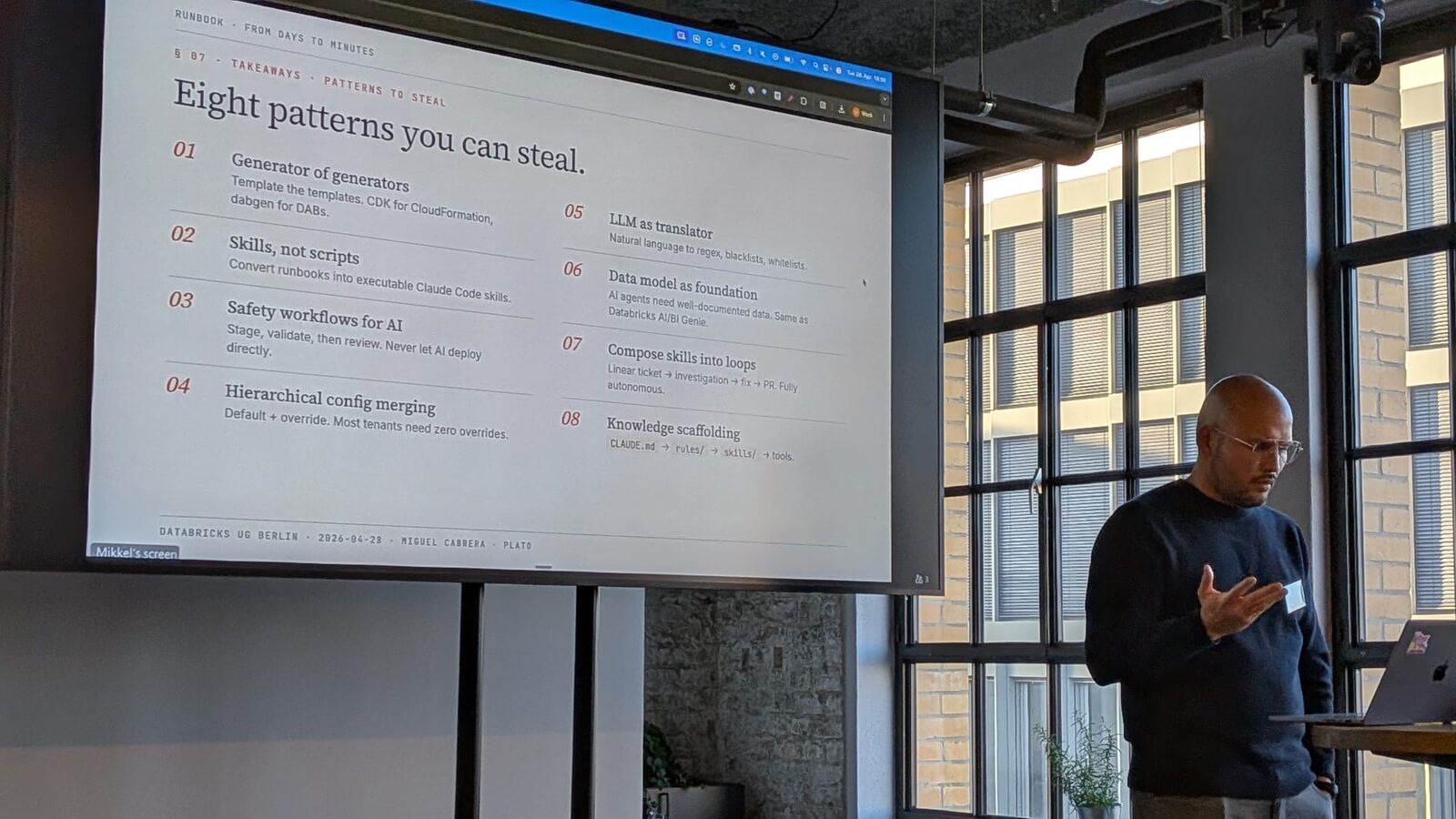
           <span class="p">(</span><span class="mi">1</span><span class="p">,</span> <span class="sh">"</span><span class="s">Thingy A</span><span class="sh">"</span><span class="p">,</span> <span class="sh">"</span><span class="s">awesome thing.</span><span class="sh">"</span><span class="p">,</span> <span class="sh">"</span><span class="s">high</span><span class="sh">"</span><span class="p">,</span> <span class="mi">0</span><span class="p">),</span>
           <span class="p">(</span><span class="mi">2</span><span class="p">,</span> <span class="sh">"</span><span class="s">Thingy B</span><span class="sh">"</span><span class="p">,</span> <span class="sh">"</span><span class="s">available at http://thingb.com</span><span class="sh">"</span><span class="p">,</span> <span class="bp">None</span><span class="p">,</span> <span class="mi">0</span><span class="p">),</span>
           <span class="p">(</span><span class="mi">3</span><span class="p">,</span> <span class="bp">None</span><span class="p">,</span> <span class="bp">None</span><span class="p">,</span> <span class="sh">"</span><span class="s">low</span><span class="sh">"</span><span class="p">,</span> <span class="mi">5</span><span class="p">),</span>
           <span class="p">(</span><span class="mi">4</span><span class="p">,</span> <span class="sh">"</span><span class="s">Thingy D</span><span class="sh">"</span><span class="p">,</span> <span class="sh">"</span><span class="s">checkout https://thingd.ca</span><span class="sh">"</span><span class="p">,</span> <span class="sh">"</span><span class="s">low</span><span class="sh">"</span><span class="p">,</span> <span class="mi">10</span><span class="p">),</span>
           <span class="p">(</span><span class="mi">5</span><span class="p">,</span> <span class="sh">"</span><span class="s">Thingy E</span><span class="sh">"</span><span class="p">,</span> <span class="bp">None</span><span class="p">,</span> <span class="sh">"</span><span class="s">high</span><span class="sh">"</span><span class="p">,</span> <span class="mi">12</span><span class="p">),</span>
       <span class="p">],</span>
       <span class="n">columns</span><span class="o">=</span><span class="p">[</span><span class="sh">"</span><span class="s">id</span><span class="sh">"</span><span class="p">,</span> <span class="sh">"</span><span class="s">productName</span><span class="sh">"</span><span class="p">,</span> <span class="sh">"</span><span class="s">description</span><span class="sh">"</span><span class="p">,</span> <span class="sh">"</span><span class="s">priority</span><span class="sh">"</span><span class="p">,</span> <span class="sh">"</span><span class="s">numViews</span><span class="sh">"</span><span class="p">]</span>
<span class="p">)</span>
</code></pre></div></div> <table> <thead> <tr> <th>id</th> <th>productName</th> <th>description</th> <th>priority</th> <th>numViews</th> </tr> </thead> <tbody> <tr> <td>1</td> <td>Thingy A</td> <td>awesome thing.</td> <td>high</td> <td>0</td> </tr> <tr> <td>2</td> <td>Thingy B</td> <td>available at http://thingb.com</td> <td>None</td> <td>0</td> </tr> <tr> <td>3</td> <td>None</td> <td>None</td> <td>low</td> <td>5</td> </tr> <tr> <td>4</td> <td>Thingy D</td> <td>checkout https://thingd.ca</td> <td>low</td> <td>10</td> </tr> <tr> <td>5</td> <td>Thingy E</td> <td>None</td> <td>high</td> <td>12</td> </tr> </tbody> </table> <p>Things that I will check on this toy data:</p> <ul> <li>there are 5 rows in total.</li> <li>values of the id attribute are never Null/None and unique.</li> <li>values of the <code class="language-plaintext highlighter-rouge">productName</code> attribute are never null/None.</li> <li>the priority attribute can only contain “high” or “low” as value.</li> <li><code class="language-plaintext highlighter-rouge">numViews</code> should not contain negative values.</li> <li>at least half of the values in description should contain a url.</li> <li>the median of <code class="language-plaintext highlighter-rouge">numViews</code> should be less than or equal to 10.</li> <li>The <code class="language-plaintext highlighter-rouge">productName</code> column contents matches the regex <code class="language-plaintext highlighter-rouge">r'Thingy [A-Z]+'</code></li> </ul> <h2 id="great-expectations">Great Expectations</h2> <p>Calling Great Expectation (GE) as library is a bit of an understatement. This is a full-fledged framework for data validation, leveraging existing tools like Jupyter Notebook and integrating with several data stores for validating data originating from them as well storing the validation results.</p> <p>The main concept of Great Expectations (GE) are well <code class="language-plaintext highlighter-rouge">expectations,</code> that as the name indicate, run assertions on expected values of a particular column.</p> <p>The simplest way to use GE is to wrap the dataframe or data source with a GE <code class="language-plaintext highlighter-rouge">DataSet</code> and quickly check individual conditions. This is useful for exploring the data and refining the data quality check.</p> <div class="language-python highlighter-rouge"><div class="highlight"><pre class="highlight"><code><span class="kn">import</span> <span class="n">great_expectations</span> <span class="k">as</span> <span class="n">ge</span>
<span class="n">ge_df</span> <span class="o">=</span> <span class="n">ge</span><span class="p">.</span><span class="nf">from_pandas</span><span class="p">(</span><span class="n">df</span><span class="p">)</span>
<span class="n">ge_df</span><span class="p">.</span><span class="nf">expect_table_row_count_to_equal</span><span class="p">(</span><span class="mi">5</span><span class="p">)</span>
<span class="n">ge_df</span><span class="p">.</span><span class="nf">expect_column_values_to_not_be_null</span><span class="p">(</span><span class="sh">"</span><span class="s">id</span><span class="sh">"</span><span class="p">)</span>
<span class="n">ge_df</span><span class="p">.</span><span class="nf">expect_column_values_to_not_be_null</span><span class="p">(</span><span class="sh">"</span><span class="s">description</span><span class="sh">"</span><span class="p">)</span>
<span class="n">ge_df</span><span class="p">.</span><span class="nf">expect_column_values_to_be_in_set</span><span class="p">(</span><span class="sh">"</span><span class="s">priority</span><span class="sh">"</span><span class="p">,</span> <span class="p">{</span><span class="sh">"</span><span class="s">high</span><span class="sh">"</span><span class="p">,</span> <span class="sh">"</span><span class="s">low</span><span class="sh">"</span><span class="p">})</span>
<span class="n">ge_df</span><span class="p">.</span><span class="nf">expect_column_values_to_be_between</span><span class="p">(</span><span class="sh">"</span><span class="s">numViews</span><span class="sh">"</span><span class="p">,</span> <span class="mi">0</span><span class="p">)</span>
<span class="nf">print</span><span class="p">(</span><span class="n">ge_df</span><span class="p">.</span><span class="nf">expect_column_median_to_be_between</span><span class="p">(</span><span class="sh">"</span><span class="s">numViews</span><span class="sh">"</span><span class="p">,</span> <span class="mi">0</span><span class="p">,</span> <span class="mi">10</span><span class="p">))</span>
</code></pre></div></div> <p>If run interactively in a Notebook, for each expectation we get a json representation of the expectation as well some metadata regarding the values and whether the expectation failed:</p> <div class="language-json highlighter-rouge"><div class="highlight"><pre class="highlight"><code><span class="p">{</span><span class="w">
  </span><span class="nl">"expectation_config"</span><span class="p">:</span><span class="w"> </span><span class="p">{</span><span class="w">
    </span><span class="nl">"meta"</span><span class="p">:</span><span class="w"> </span><span class="p">{},</span><span class="w">
    </span><span class="nl">"expectation_type"</span><span class="p">:</span><span class="w"> </span><span class="s2">"expect_column_median_to_be_between"</span><span class="p">,</span><span class="w">
    </span><span class="nl">"kwargs"</span><span class="p">:</span><span class="w"> </span><span class="p">{</span><span class="w">
      </span><span class="nl">"column"</span><span class="p">:</span><span class="w"> </span><span class="s2">"numViews"</span><span class="p">,</span><span class="w">
      </span><span class="nl">"min_value"</span><span class="p">:</span><span class="w"> </span><span class="mi">0</span><span class="p">,</span><span class="w">
      </span><span class="nl">"max_value"</span><span class="p">:</span><span class="w"> </span><span class="mi">10</span><span class="p">,</span><span class="w">
      </span><span class="nl">"result_format"</span><span class="p">:</span><span class="w"> </span><span class="s2">"BASIC"</span><span class="w">
    </span><span class="p">}</span><span class="w">
  </span><span class="p">},</span><span class="w">
  </span><span class="nl">"success"</span><span class="p">:</span><span class="w"> </span><span class="kc">true</span><span class="p">,</span><span class="w">
  </span><span class="nl">"exception_info"</span><span class="p">:</span><span class="w"> </span><span class="p">{</span><span class="w">
    </span><span class="nl">"raised_exception"</span><span class="p">:</span><span class="w"> </span><span class="kc">false</span><span class="p">,</span><span class="w">
    </span><span class="nl">"exception_traceback"</span><span class="p">:</span><span class="w"> </span><span class="kc">null</span><span class="p">,</span><span class="w">
    </span><span class="nl">"exception_message"</span><span class="p">:</span><span class="w"> </span><span class="kc">null</span><span class="w">
  </span><span class="p">},</span><span class="w">
  </span><span class="nl">"meta"</span><span class="p">:</span><span class="w"> </span><span class="p">{},</span><span class="w">
  </span><span class="nl">"result"</span><span class="p">:</span><span class="w"> </span><span class="p">{</span><span class="w">
    </span><span class="nl">"observed_value"</span><span class="p">:</span><span class="w"> </span><span class="mf">5.0</span><span class="p">,</span><span class="w">
    </span><span class="nl">"element_count"</span><span class="p">:</span><span class="w"> </span><span class="mi">5</span><span class="p">,</span><span class="w">
    </span><span class="nl">"missing_count"</span><span class="p">:</span><span class="w"> </span><span class="kc">null</span><span class="p">,</span><span class="w">
    </span><span class="nl">"missing_percent"</span><span class="p">:</span><span class="w"> </span><span class="kc">null</span><span class="w">
  </span><span class="p">}</span><span class="w">
</span><span class="p">}</span><span class="w">
</span></code></pre></div></div> <p>However this is not the optimal way to use GE. The documentation states that is better to properly configure the datasets and generate a standard directory structure. This is done through a <em>Data Context</em> and requires some scaffolding and generating some files using the command line:</p> <div class="language-console highlighter-rouge"><div class="highlight"><pre class="highlight"><code><span class="gp">[miguelc@machine]$</span><span class="w"> </span>great_expectations <span class="nt">--v3-api</span> init
<span class="go">
Using v3 (Batch Request) API

  ___              _     ___                  _        _   _
 / __|_ _ ___ __ _| |_  | __|_ ___ __  ___ __| |_ __ _| |_(_)___ _ _  ___
| (_ | '_/ -_) _` |  _| | _|\ \ / '_ \/ -_) _|  _/ _` |  _| / _ \ ' \(_-&lt;
 \___|_| \___\__,_|\__| |___/_\_\ .__/\___\__|\__\__,_|\__|_\___/_||_/__/
                                |_|
             ~ Always know what to expect from your data ~

Let's configure a new Data Context.

First, Great Expectations will create a new directory:

    great_expectations
    |-- great_expectations.yml
    |-- expectations
    |-- checkpoints
    |-- notebooks
    |-- plugins
    |-- .gitignore
    |-- uncommitted
        |-- config_variables.yml
        |-- documentation
 (...)
</span></code></pre></div></div> <p>Basically, the process goes as follows:</p> <ol> <li>Generate the directory structure (using for example the command above)</li> <li>Generate a new data source. You can select - This opens a Jupyter notebook where you configure the data source and store the configuration under <code class="language-plaintext highlighter-rouge">great_expectations.yml</code></li> <li>Create the expectation suite, using the <a href="https://docs.greatexpectations.io/en/latest/reference/glossary_of_expectations.html#expectation-glossary">built-in expectations</a> using also Jupyter Notebooks. You store the expectations as <code class="language-plaintext highlighter-rouge">json</code> in the <code class="language-plaintext highlighter-rouge">expectations'</code> directory. A nice way to get started is to use the automated data profiler that examines that data source and generates the expectations.</li> <li>Once you execute the notebook, the data docs are shown. <a href="https://docs.greatexpectations.io/en/latest/reference/core_concepts.html#data-docs">Data docs</a> show the result of the expectations and other metadata in a nice HTML format that can be useful to learn more about the data.</li> </ol> <p>Once you have created the initial set of expectations you can edit them using the command <code class="language-plaintext highlighter-rouge">great_expectations --v3-api suite edit articles.warning</code>. You will have to choose whether you want to interact with a batch (sample) of data or not. This will also open a Notebook where you depending on your choice will be able to edit the existing expectations in <a href="https://docs.greatexpectations.io/en/latest/guides/how_to_guides/creating_and_editing_expectations/how_to_create_a_new_expectation_suite_without_a_sample_batch.html">slightly different ways</a>.</p> <p>Now that you have your expectations set up you can then use them to validate a new batch of data. For that, you need to learn a new additional concept called <a href="https://docs.greatexpectations.io/en/latest/reference/core_concepts/checkpoints_and_actions.html#checkpoints-and-actions">Checkpoints</a>. A Checkpoint bundles Batches of data with corresponding Expectation Suites for validation. To create a checkpoint you need, you guessed right, another nice command line and another Jupyter Notebook.</p> <div class="language-console highlighter-rouge"><div class="highlight"><pre class="highlight"><code><span class="gp">[miguelc@machine]$</span><span class="w"> </span>great_expectations <span class="nt">--v3-api</span> checkpoint new my_checkpoint
</code></pre></div></div> <p>If you can execute the above command, it will open a Jupyter Notebook where you can then configure a bunch of stuff using YAML. The key idea here is that with this Checkpoint you link an <code class="language-plaintext highlighter-rouge">expectation_suite</code> with a particular data asset coming from a data source.</p> <p>Optionally, you can run the checkpoint (the full expectation on the data source) and see the results on the already familiar data_docs interface.</p> <p>As for deployment. one pattern would be to run the checkpoint as a task in some sort of workflow manager (such as <a href="https://legacy.docs.greatexpectations.io/en/latest/guides/how_to_guides/validation/how_to_run_a_checkpoint_in_airflow.html#how-to-guides-validation-how-to-run-a-checkpoint-in-airflow">Airflow</a> or Luigi), you can also run the Checkpoints programmatically using python or straight from the <a href="https://legacy.docs.greatexpectations.io/en/latest/guides/how_to_guides/validation/how_to_run_a_checkpoint_in_terminal.html#how-to-guides-validation-how-to-run-a-checkpoint-in-terminal">terminal</a>.</p> <p>I recently found out that if you use <a href="https://www.getdbt.com/">dbt</a>, you get GE installed by default and can be used to extend the unit tests of the SQL queries you write.</p> <h3 id="the-good">The Good</h3> <ul> <li>Interactive validation and expectation testing. The instant feedback helps to refine and add checks for data.</li> <li>When an expectation fails, you get a sample of the data that does make the expectation fail. This is useful for debugging.</li> <li>It is not limited to pandas data frames, it comes with support for many data sources including SQL databases (via SQLAlchemy) and Spark dataframes.</li> </ul> <h3 id="the-not-so-good">The not so good</h3> <ul> <li>Seems heavy and full of things. Getting started might not be as easy as there are many concepts to master.</li> <li>Although it might seem natural for many potential users, the coupling with Jupyter Notebook/Lab might make some uncomfortable.</li> <li>Expectations are stored as JSON instead of code.</li> <li>They received some funding recently and they are changing many of already existing (and already large) concepts and API, making the whole process of learning even more challenging.</li> </ul> <h2 id="pandera">Pandera</h2> <p><a href="https://pandera.readthedocs.io/en/stable/">Pandera</a> is “statistical data validation for pandas”. Using Pandera is simple, after installing the package you have to define a Schema object where each column has a set of checks. Columns might be optionally nullable. That is, checking for nulls is not a check per se but a quality/characteristic of a column.</p> <div class="language-python highlighter-rouge"><div class="highlight"><pre class="highlight"><code><span class="kn">import</span> <span class="n">pandas</span> <span class="k">as</span> <span class="n">pd</span>
<span class="kn">import</span> <span class="n">pandera</span> <span class="k">as</span> <span class="n">pa</span>

<span class="n">df</span> <span class="o">=</span> <span class="n">pd</span><span class="p">.</span><span class="nc">DataFrame</span><span class="p">(</span>
       <span class="p">[</span>
           <span class="p">(</span><span class="mi">1</span><span class="p">,</span> <span class="sh">"</span><span class="s">Thingy A</span><span class="sh">"</span><span class="p">,</span> <span class="sh">"</span><span class="s">awesome thing.</span><span class="sh">"</span><span class="p">,</span> <span class="sh">"</span><span class="s">high</span><span class="sh">"</span><span class="p">,</span> <span class="mi">0</span><span class="p">),</span>
           <span class="p">(</span><span class="mi">2</span><span class="p">,</span> <span class="sh">"</span><span class="s">Thingy B</span><span class="sh">"</span><span class="p">,</span> <span class="sh">"</span><span class="s">available at http://thingb.com</span><span class="sh">"</span><span class="p">,</span> <span class="bp">None</span><span class="p">,</span> <span class="mi">0</span><span class="p">),</span>
           <span class="p">(</span><span class="mi">3</span><span class="p">,</span> <span class="bp">None</span><span class="p">,</span> <span class="bp">None</span><span class="p">,</span> <span class="sh">"</span><span class="s">low</span><span class="sh">"</span><span class="p">,</span> <span class="mi">5</span><span class="p">),</span>
           <span class="p">(</span><span class="mi">4</span><span class="p">,</span> <span class="sh">"</span><span class="s">Thingy D</span><span class="sh">"</span><span class="p">,</span> <span class="sh">"</span><span class="s">checkout https://thingd.ca</span><span class="sh">"</span><span class="p">,</span> <span class="sh">"</span><span class="s">low</span><span class="sh">"</span><span class="p">,</span> <span class="mi">10</span><span class="p">),</span>
           <span class="p">(</span><span class="mi">5</span><span class="p">,</span> <span class="sh">"</span><span class="s">Thingy E</span><span class="sh">"</span><span class="p">,</span> <span class="bp">None</span><span class="p">,</span> <span class="sh">"</span><span class="s">high</span><span class="sh">"</span><span class="p">,</span> <span class="mi">12</span><span class="p">),</span>
       <span class="p">],</span>
       <span class="n">columns</span><span class="o">=</span><span class="p">[</span><span class="sh">"</span><span class="s">id</span><span class="sh">"</span><span class="p">,</span> <span class="sh">"</span><span class="s">productName</span><span class="sh">"</span><span class="p">,</span> <span class="sh">"</span><span class="s">description</span><span class="sh">"</span><span class="p">,</span> <span class="sh">"</span><span class="s">priority</span><span class="sh">"</span><span class="p">,</span> <span class="sh">"</span><span class="s">numViews</span><span class="sh">"</span><span class="p">]</span>
<span class="p">)</span>

<span class="n">schema</span> <span class="o">=</span> <span class="n">pa</span><span class="p">.</span><span class="nc">DataFrameSchema</span><span class="p">({</span>
    <span class="sh">"</span><span class="s">id</span><span class="sh">"</span><span class="p">:</span> <span class="n">pa</span><span class="p">.</span><span class="nc">Column</span><span class="p">(</span><span class="nb">int</span><span class="p">,</span> <span class="n">nullable</span><span class="o">=</span><span class="bp">False</span><span class="p">),</span>
    <span class="sh">"</span><span class="s">description</span><span class="sh">"</span><span class="p">:</span> <span class="n">pa</span><span class="p">.</span><span class="nc">Column</span><span class="p">(</span><span class="nb">str</span><span class="p">,</span> <span class="n">nullable</span><span class="o">=</span><span class="bp">False</span><span class="p">),</span>
    <span class="sh">"</span><span class="s">priority</span><span class="sh">"</span><span class="p">:</span> <span class="n">pa</span><span class="p">.</span><span class="nc">Column</span><span class="p">(</span><span class="nb">str</span><span class="p">,</span> <span class="n">checks</span><span class="o">=</span><span class="n">pa</span><span class="p">.</span><span class="n">Check</span><span class="p">.</span><span class="nf">isin</span><span class="p">([</span><span class="sh">"</span><span class="s">high</span><span class="sh">"</span><span class="p">,</span> <span class="sh">"</span><span class="s">low</span><span class="sh">"</span><span class="p">]),</span> <span class="n">nullable</span><span class="o">=</span><span class="bp">True</span><span class="p">),</span>
    <span class="sh">"</span><span class="s">numViews</span><span class="sh">"</span><span class="p">:</span> <span class="n">pa</span><span class="p">.</span><span class="nc">Column</span><span class="p">(</span><span class="nb">int</span><span class="p">,</span> <span class="n">checks</span><span class="o">=</span><span class="p">[</span>
        <span class="n">pa</span><span class="p">.</span><span class="n">Check</span><span class="p">.</span><span class="nf">greater_than_or_equal_to</span><span class="p">(</span><span class="mi">0</span><span class="p">),</span>
        <span class="n">pa</span><span class="p">.</span><span class="nc">Check</span><span class="p">(</span><span class="k">lambda</span> <span class="n">c</span><span class="p">:</span> <span class="n">c</span><span class="p">.</span><span class="nf">median</span><span class="p">()</span> <span class="o">&gt;=</span> <span class="mi">0</span> <span class="ow">and</span> <span class="n">c</span><span class="p">.</span><span class="nf">median</span><span class="p">()</span> <span class="o">&lt;=</span> <span class="mi">10</span><span class="p">)</span>
        <span class="p">]</span>
    <span class="p">),</span>
    <span class="sh">"</span><span class="s">productName</span><span class="sh">"</span><span class="p">:</span> <span class="n">pa</span><span class="p">.</span><span class="nc">Column</span><span class="p">(</span><span class="nb">str</span><span class="p">,</span> <span class="n">nullable</span><span class="o">=</span><span class="bp">False</span><span class="p">),</span>

<span class="p">})</span>

<span class="n">validated_df</span> <span class="o">=</span> <span class="nf">schema</span><span class="p">(</span><span class="n">df</span><span class="p">)</span>
<span class="nf">print</span><span class="p">(</span><span class="n">validated_df</span><span class="p">)</span>
</code></pre></div></div> <p>If you run the validation an exception will be raised:</p> <div class="language-plaintext highlighter-rouge"><div class="highlight"><pre class="highlight"><code>Traceback (most recent call last):
  File "&lt;stdin&gt;", line 26, in &lt;module&gt;
  File ".../lib/python3.9/site-packages/pandera/schemas.py", line 648, in __call__
    return self.validate(
  File ".../lib/python3.9/site-packages/pandera/schemas.py", line 594, in validate
    error_handler.collect_error("schema_component_check", err)
  File ".../lib/python3.9/site-packages/pandera/error_handlers.py", line 32, in collect_error
    raise schema_error from original_exc
  File ".../lib/python3.9/site-packages/pandera/schemas.py", line 586, in validate
    result = schema_component(
  File ".../lib/python3.9/site-packages/pandera/schemas.py", line 1826, in __call__
    return self.validate(
  File ".../lib/python3.9/site-packages/pandera/schema_components.py", line 214, in validate
    validate_column(check_obj, column_name)
  File ".../lib/python3.9/site-packages/pandera/schema_components.py", line 187, in validate_column
    super(Column, copy(self).set_name(column_name)).validate(
  File ".../lib/python3.9/site-packages/pandera/schemas.py", line 1720, in validate
    error_handler.collect_error(
  File ".../lib/python3.9/site-packages/pandera/error_handlers.py", line 32, in collect_error
    raise schema_error from original_exc
pandera.errors.SchemaError: non-nullable series 'description' contains null values: {2: None, 4: None}
</code></pre></div></div> <p>The code would look similar to other data validation libraries (e.g. <a href="https://marshmallow.readthedocs.io/en/stable/">Marshmallow</a>). Also, compared to GE the library offers the Schema abstraction, which you might or not like it.</p> <p>With Pandera, if a check fails, it will raise a proper exception (you can disable this and turn it into a <code class="language-plaintext highlighter-rouge">RuntimeWarning</code>). Depending on how you might want to integrate the checks into the larger pipeline, this might be useful or plainly annoying. Furthermore, if you look closely, Pandera only displays one validation error as the cause of the validation error, although there is more than one column that does not comply with the specification.</p> <p>Given that this is Python library is relatively easy to integrate into any existing pipeline. It can be a task in Luigi/Airflow for example or something that could be run as part of a larger task.</p> <h3 id="the-good-1">The Good</h3> <ul> <li>Familiar API based on schema checking that makes the library easy to get started with.</li> <li>Support for hypothesis testing on the columns.</li> <li>Data profiling and recommendation of checks that could be relevant.</li> </ul> <h3 id="the-not-so-good-1">The not so good</h3> <ul> <li>Very few checks included under the <code class="language-plaintext highlighter-rouge">pa.Check</code> class</li> <li>The message is not very informative if the check is done through a lambda function.</li> <li>Errors during the checking procedure will raise a run-time exception by default.</li> <li>It apparently only works with Pandas, it is not clear if it would work with any other implementation or Spark.</li> <li>I did not find a way to test for properties on the size of the dataframe or to do comparisons across different runs (i.e. the number of rows should not decrease between runs of the check).</li> </ul> <h2 id="deequpydeequ">Deequ/PyDeequ</h2> <p>Last but not least, let us talk about Deequ. Deequ a data checking library written in Scala targeted towards Spark/PySpark dataframes and thus aims to check large datasets making use of Spark optimization to run in a performant manner. PyDeequ, as the name implies, is a Python wrapper offering the same API for pySpark.</p> <p>The idea behind deequ is to create “<em>unit tests for data</em>”, to do that, Deequ calculates <code class="language-plaintext highlighter-rouge">Metrics</code> through <code class="language-plaintext highlighter-rouge">Analyzers</code>, and assertions are verified based on that metric. A <code class="language-plaintext highlighter-rouge">Check</code> is a set of assertions to be checked. One interesting feature of (Py)Deequ is that it allows comparing metrics across different runs, allowing to perform assertions on changes on the data (e.g. an unexpected jump in the number of rows of a dataframe).</p> <div class="language-python highlighter-rouge"><div class="highlight"><pre class="highlight"><code><span class="kn">from</span> <span class="n">pydeequ.checks</span> <span class="kn">import</span> <span class="n">Check</span>
<span class="kn">from</span> <span class="n">pydeequ.verification</span> <span class="kn">import</span> <span class="n">VerificationSuite</span>

<span class="n">check</span> <span class="o">=</span> <span class="nc">Check</span><span class="p">(</span><span class="n">spark</span><span class="p">,</span> <span class="n">CheckLevel</span><span class="p">.</span><span class="nb">Warning</span><span class="p">,</span> <span class="sh">"</span><span class="s">Review Check</span><span class="sh">"</span><span class="p">)</span>

<span class="n">checkResult</span> <span class="o">=</span> <span class="p">(</span>
    <span class="nc">VerificationSuite</span><span class="p">(</span><span class="n">spark</span><span class="p">)</span>
    <span class="p">.</span><span class="nf">onData</span><span class="p">(</span><span class="n">df</span><span class="p">)</span>
    <span class="p">.</span><span class="nf">addCheck</span><span class="p">(</span>
        <span class="n">check</span>
        <span class="p">.</span><span class="nf">hasSize</span><span class="p">(</span><span class="k">lambda</span> <span class="n">sz</span><span class="p">:</span> <span class="n">sz</span> <span class="o">==</span> <span class="mi">5</span><span class="p">)</span>  <span class="c1"># we expect 5 rows
</span>          <span class="p">.</span><span class="nf">isComplete</span><span class="p">(</span><span class="sh">"</span><span class="s">id</span><span class="sh">"</span><span class="p">)</span>  <span class="c1"># should never be None/Null
</span>          <span class="p">.</span><span class="nf">isUnique</span><span class="p">(</span><span class="sh">"</span><span class="s">id</span><span class="sh">"</span><span class="p">)</span>  <span class="c1"># should not contain duplicates
</span>          <span class="p">.</span><span class="nf">isComplete</span><span class="p">(</span><span class="sh">"</span><span class="s">productName</span><span class="sh">"</span><span class="p">)</span>  <span class="c1"># should never be None/Null
</span>          <span class="p">.</span><span class="nf">isContained_in</span><span class="p">(</span><span class="sh">"</span><span class="s">priority</span><span class="sh">"</span><span class="p">,</span> <span class="p">(</span><span class="sh">"</span><span class="s">high</span><span class="sh">"</span><span class="p">,</span> <span class="sh">"</span><span class="s">low</span><span class="sh">"</span><span class="p">))</span>
          <span class="p">.</span><span class="nf">isNonNegative</span><span class="p">(</span><span class="sh">"</span><span class="s">numViews</span><span class="sh">"</span><span class="p">)</span>
          <span class="c1"># at least half of the descriptions should contain a url
</span>          <span class="p">.</span><span class="nf">containsUrl</span><span class="p">(</span><span class="sh">"</span><span class="s">description</span><span class="sh">"</span><span class="p">,</span> <span class="k">lambda</span> <span class="n">d</span><span class="p">:</span> <span class="n">d</span> <span class="o">&gt;=</span> <span class="mf">0.5</span><span class="p">)</span>
          <span class="c1"># half of the items should have less than 10 views
</span>          <span class="p">.</span><span class="nf">hasQuantile</span><span class="p">(</span><span class="sh">"</span><span class="s">numViews</span><span class="sh">"</span><span class="p">,</span> <span class="mf">0.5</span><span class="p">,</span> <span class="k">lambda</span> <span class="n">v</span><span class="p">:</span> <span class="n">v</span> <span class="o">&lt;=</span> <span class="mi">10</span><span class="p">)</span>
        <span class="p">)</span>
    <span class="p">.</span><span class="nf">run</span><span class="p">()</span>
<span class="p">)</span>

<span class="n">checkResult_df</span> <span class="o">=</span> <span class="n">VerificationResult</span><span class="p">.</span><span class="nf">checkResultsAsDataFrame</span><span class="p">(</span><span class="n">spark</span><span class="p">,</span> <span class="n">checkResult</span><span class="p">)</span>
<span class="n">checkResult_df</span><span class="p">.</span><span class="nf">show</span><span class="p">()</span>
</code></pre></div></div> <p>After calling run, PyDeequ will compute some metrics on the data. Afterwards it invokes your assertion functions (e.g., <code class="language-plaintext highlighter-rouge">lambda sz: sz == 5</code> for the size check) on these metrics to see if the constraints hold on the data. The metrics calculated can be stored in a <code class="language-plaintext highlighter-rouge">MetricRepository</code> (e.g. S3 or disk) for future reference and to make comparison between metrics of different runs.</p> <p>(Py)Deequ allows for differential calculations of metrics, that is, the metrics calculated for a dataset can be updated when the data increases without having to recalculate the metrics from the whole dataset.</p> <p>Another unique feature of (Py)Deequ is anomaly detection, whereas GreatExpections allows for single thresholds, (Py)Deequ allows for a checks based on a running average and standard deviation of the metrics calculated.</p> <p>Similar to Pandera, PyDeequ is easy to integrate to your existing code base as it is PySpark/Python code.</p> <h3 id="deequ-for-pandas-dataframes">Deequ for Pandas DataFrames</h3> <p>You might be wondering if you can use (Py)Deequ for Pandas, and it is sadly not possible. However, almost a year ago I developed an experimental port Deequ to Pandas. I called it <a href="https://github.com/mfcabrera/hooqu">Hooqu</a>. However, due to personal constraints, I haven’t been able to maintain it, but it is still functional (albeit by using a lot of Pandas hacks) and you can install it via pip.</p> <h3 id="the-good-2">The Good</h3> <ul> <li>Use PySpark to parallelize otherwise expensive checks.</li> <li>Support for external metric repositories.</li> <li>Data profiling.</li> <li>Constraint suggestion.</li> </ul> <h3 id="the-not-so-good-2">The not so good</h3> <ul> <li>This is not a pure Python project, rather a wrapper over a Scala/Spark library, and thus the code might not look pythonic.</li> <li>Only make sense to use it if you are already using a (py)Spark cluster.</li> <li>It is your responsibility to load the data from whenever it resides into a Spark dataframe. There are no “connectors” or “loaders” off-the-shelf.</li> </ul> <h2 id="comparison-table">Comparison table</h2> <p>Let’s finish with a table summarizing the features of the different libraries:</p> <table> <thead> <tr> <th>Feature</th> <th>GreatExpectations</th> <th>Pandera</th> <th>PyDeequ</th> </tr> </thead> <tbody> <tr> <td>Checks Extension dimension (Values)</td> <td>✓</td> <td>✓</td> <td>✓</td> </tr> <tr> <td>Checks the intension dimension (Schema)</td> <td>✗</td> <td>✓</td> <td>✗</td> </tr> <tr> <td>Pandas support¹</td> <td>✓</td> <td>✓</td> <td>✗</td> </tr> <tr> <td>Spark support</td> <td>✓</td> <td>✗</td> <td>✓</td> </tr> <tr> <td>Multiple data sources (Database loaders, etc.)</td> <td>✓</td> <td>✗</td> <td>✗</td> </tr> <tr> <td>Data Profiling</td> <td>✓</td> <td>✗</td> <td>✓</td> </tr> <tr> <td>Constraint/Check Suggestion</td> <td>✓</td> <td>✗</td> <td>✓</td> </tr> <tr> <td>Hypothesis Testing</td> <td>✗</td> <td>✓</td> <td>✗</td> </tr> <tr> <td>Incremental computation of the checks</td> <td>✗</td> <td>✗</td> <td>✓</td> </tr> <tr> <td>Simple Anomaly Detection</td> <td>✓</td> <td>✗</td> <td>✓</td> </tr> <tr> <td>Complex Anomaly Detection²</td> <td>✗</td> <td>✗</td> <td>✓</td> </tr> </tbody> </table> <ol> <li>Hooqu offers a PyDeequ-like API for Pandas dataframes.</li> <li>Using running averages and standard deviation of incremental computation.</li> </ol> <h2 id="final-notes">Final Notes</h2> <p>So, after all this deluge of information, which library should I use?. Well, all these libraries have their strong points and the best choice will depend on your goal, which environment are you familiar with, and the sort of checks you want to perform.</p> <p>For small Pandas-heavy projects, I would recommend using Pandera (or Hooqu if you are a brave soul). If your organization is larger, you like Jupyter notebooks, and you do not mind the learning curve, I would recommend GreatExpectations as it has currently a lot of traction. If you write your pipelines mostly in (Py)Spark and you care about performance I would go for (Py)Deequ. Both are Apache projects, are easy to integrate with your codebase, and will make better use of your Spark cluster.</p>]]></content><author><name></name></author><category term="pydata"/><category term="data"/><category term="python"/><category term="pandas"/><category term="spark"/><category term="dataqa"/><category term="machine_learning"/><category term="data_quality"/><category term="great_expectations"/><category term="pandera"/><category term="deequ"/><category term="data_validation"/><category term="ml_pipelines"/><category term="data_engineering"/><summary type="html"><![CDATA[A comparison of data validation libraries for Pandas and Spark DataFrames]]></summary></entry><entry><title type="html">Testing Spark tasks with PyTest, Mock and Luigi</title><link href="https://mfcabrera.com/blog/2017/spark-testing-luigi-pytest/" rel="alternate" type="text/html" title="Testing Spark tasks with PyTest, Mock and Luigi"/><published>2017-09-17T12:18:52+00:00</published><updated>2017-09-17T12:18:52+00:00</updated><id>https://mfcabrera.com/blog/2017/spark-testing-luigi-pytest</id><content type="html" xml:base="https://mfcabrera.com/blog/2017/spark-testing-luigi-pytest/"><![CDATA[<h2 id="tldr">TL;DR</h2> <p>In this blog post I describe briefly how to test PySpark tasks using a combination of Luigi, PyTest and Mock.</p> <h2 id="intro">Intro</h2> <p>At TrustYou we have a lot of Hadoop streaming Python jobs. Most of them are written in Python (and some in Pig). One of the things that bothered me a lot of working in such way is that testing may become complicated as simulating the cluster setting might impose some restrictions.</p> <p>Although not the only reason, the complexity of testing such types of processing pipelines might contribute to ignore testing part, mostly under the believe that it is not needed or worth. The trickiest part is that problems in a particular part a data processing pipeline might only become evident in a upstream stage, making debugging difficult.</p> <p>Luckily, Spark and PySpark make testing simpler as they allow to run Spark application in local cluster making available all the high level abstractions such as DataFrames. This combined with Pytest, Luigi and Pytest-Fixtures.</p> <h2 id="pyspark-tasks-with-luigi">PySpark Tasks with Luigi</h2> <p>Let’s start with the basics of how to run a PySpark with Luigi. Luigi has the concept of Task, which is basically a step in a data pipeline. For example dumping data from a database or running a MapReduce job. To run a Spark job you simple need to set the spark configuration in the Luigi configuration file (luigi.cfg) and create a class that inherit from <code class="language-plaintext highlighter-rouge">luigi.contrib.spark.PySparkTask</code>:</p> <div class="language-python highlighter-rouge"><div class="highlight"><pre class="highlight"><code><span class="kn">from</span> <span class="n">luigi.contrib.spark</span> <span class="kn">import</span> <span class="n">PySparkTask</span>
<span class="kn">from</span> <span class="n">luigi.contrib.hdfs</span> <span class="kn">import</span> <span class="n">HdfsTarget</span>

<span class="k">class</span> <span class="nc">SamplePySparkTask</span><span class="p">(</span><span class="n">PySparkTask</span><span class="p">):</span>
    <span class="c1"># Spark options can be set a class attributes
</span>    <span class="n">driver_memory</span> <span class="o">=</span> <span class="sh">'</span><span class="s">4g</span><span class="sh">'</span>
    <span class="n">executor_memory</span> <span class="o">=</span> <span class="sh">'</span><span class="s">16g</span><span class="sh">'</span>
    <span class="n">num_executors</span> <span class="o">=</span> <span class="mi">8</span>
    <span class="n">executor_cores</span> <span class="o">=</span> <span class="mi">2</span>

    <span class="k">def</span> <span class="nf">main</span><span class="p">(</span><span class="n">self</span><span class="p">,</span> <span class="n">sparkContext</span><span class="p">):</span>
        <span class="c1"># This is where implement the method
</span>        <span class="k">pass</span>

    <span class="k">def</span> <span class="nf">output</span><span class="p">(</span><span class="n">self</span><span class="p">):</span>
        <span class="c1"># After executing main this file should exists for this task to be considered completed
</span>        <span class="k">return</span> <span class="nc">HdfsTarget</span><span class="p">(</span><span class="sh">'</span><span class="s">myresult.txt</span><span class="sh">'</span><span class="p">)</span>

    <span class="k">def</span> <span class="nf">requires</span><span class="p">(</span><span class="n">self</span><span class="p">):</span>
        <span class="c1"># This should return either a task of a required file.
</span>        <span class="k">pass</span>
</code></pre></div></div> <p>Above is the basic structure of a task. The method <code class="language-plaintext highlighter-rouge">main</code> receives the Spark context as variable. For Luigi it does not matter what we do with the context as long as we have the output declared in the <code class="language-plaintext highlighter-rouge">output</code> method.</p> <p>Now Let’s test for example a Task that loads a CSV with the following structure.</p> <p><em>TODO: find out how make a good looking table with Bootstrap</em></p> <p>Our little Spark task will group by user and get the average and will output the result as JSON Line file using the following format.</p> <div class="language-json highlighter-rouge"><div class="highlight"><pre class="highlight"><code><span class="p">{</span><span class="w">
  </span><span class="nl">"customer"</span><span class="p">:</span><span class="w"> </span><span class="s2">"Mario X."</span><span class="p">,</span><span class="w">
  </span><span class="nl">"month"</span><span class="p">:</span><span class="w"> </span><span class="s2">"June"</span><span class="p">,</span><span class="w">
  </span><span class="nl">"average"</span><span class="p">:</span><span class="w"> </span><span class="mf">123.42</span><span class="w">
</span><span class="p">}</span><span class="w">
</span></code></pre></div></div> <p>The necessary Luigi configuration would be as following (assuming Spark is installed):</p> <div class="language-ini highlighter-rouge"><div class="highlight"><pre class="highlight"><code><span class="nn">[spark]</span><span class="w">
</span><span class="na">master:</span><span class="w"> </span><span class="na">local</span><span class="w">
</span></code></pre></div></div> <h2 id="testing-with-fixtures">Testing with fixtures</h2> <p>For running a Luigi pipe we require to have a luigi configuration loaded into memory. In a real world pipe it will contain luigi specific configuration along with application specific setting.</p> <p>This is a good example for a fixture…</p> <p><em>Note: This post appears to be incomplete in the original source.</em></p> <h2 id="getting-fancier---using-hypothesis-to-generate-test-data">Getting Fancier - Using Hypothesis to generate test data</h2> <p><em>To be continued…</em></p> <h2 id="schema-testing-with-json-schemas-and-voluptuous">Schema Testing with JSON schemas and Voluptuous</h2> <p><em>To be continued…</em></p>]]></content><author><name></name></author><category term="software_development"/><category term="python"/><category term="spark"/><category term="pyspark"/><category term="testing"/><category term="luigi"/><category term="pytest"/><category term="mock"/><category term="data_pipelines"/><category term="big_data"/><category term="hadoop"/><category term="mapreduce"/><category term="unit_testing"/><summary type="html"><![CDATA[Testing PySpark tasks using Luigi, PyTest and Mock]]></summary></entry><entry><title type="html">Using mypy for Improving your Codebase</title><link href="https://mfcabrera.com/blog/2017/using-mypy-for-improving-your-codebase/" rel="alternate" type="text/html" title="Using mypy for Improving your Codebase"/><published>2017-05-14T12:18:52+00:00</published><updated>2017-05-14T12:18:52+00:00</updated><id>https://mfcabrera.com/blog/2017/using-mypy-for-improving-your-codebase</id><content type="html" xml:base="https://mfcabrera.com/blog/2017/using-mypy-for-improving-your-codebase/"><![CDATA[<div class="pull-right" style="margin-left: 10px;"> <a href="https://www.xkcd.com/353/"> <img src="https://imgs.xkcd.com/comics/python.png" target="_blank" class="img-responsive img-thumbnail" height="368" width="324" style="margin: 2px;"/> </a> </div> <h2 id="tldr">TL;DR</h2> <p>In this article I use <a href="http://mypy-lang.org/">mypy</a> to document and add static type checking to an existing codebase and I describe the reasons why I believe using mypy can help in the refactoring and documentation of legacy code while following the <a href="http://programmer.97things.oreilly.com/wiki/index.php/The_Boy_Scout_Rule">The Boy Scout Rule</a>.</p> <h2 id="intro">Intro</h2> <p>We all love Python, it is a multi-paradigm dynamic programming language very popular in Data Science and Machine Learning. Besides some small quirky things in the language, I am quite happy with how it is evolving. However, there are some areas where I thought Python could do better for improving programming productivity in specific contexts:</p> <ul> <li> <p>While is easy to hack around scripts and get something running, managing a large complex codebase becomes an issue. You can get something working really fast, but maintaining it can become an issue if your code base becomes large enough.</p> </li> <li> <p>Many times while reading other people’s code (heck, even my own code), and even when documented, it is really hard to figure out what a method or function is doing without a clear knowledge of the types you are working with. In many cases having just the type information (i.e. via a simple comment) would make understanding the code a whole lot faster.</p> </li> </ul> <p>I have also spent a lot of time debugging just because the wrong type was passed to a function/method (e.g. the wrong variable was passed to a method, wrong argument order, etc.). Because of Python’s dynamic typing the interpreter and/or linter could not warn me. Plus, some of those errors only were evident at execution time, generally in edge cases.</p> <p>Although we all like working on greenfield projects, in the real world you will have to work with legacy code and it will generally be ugly and full of issues. Let’s take a look at at some Python 2.7 <em>legacy</em> code I have to maintain:</p> <div class="language-python highlighter-rouge"><div class="highlight"><pre class="highlight"><code><span class="c1"># snnipets.py
</span><span class="k">def</span> <span class="nf">get_hotel_type_snippets</span><span class="p">(</span><span class="n">self</span><span class="p">,</span> <span class="n">hotel_type_id</span><span class="p">,</span> <span class="n">cat_set</span><span class="p">):</span>
    <span class="n">snippets</span> <span class="o">=</span> <span class="n">self</span><span class="p">.</span><span class="nf">get_snippets</span><span class="p">(</span><span class="n">hotel_type_id</span><span class="p">,</span> <span class="sh">"</span><span class="s">pos</span><span class="sh">"</span><span class="p">)</span>
    <span class="n">snippets</span> <span class="o">+=</span> <span class="nf">list</span><span class="p">(</span><span class="n">it</span><span class="p">.</span><span class="n">chain</span><span class="p">.</span><span class="nf">from_iterable</span><span class="p">(</span>
        <span class="n">self</span><span class="p">.</span><span class="nf">get_snippets</span><span class="p">(</span>
            <span class="n">rel_cat</span><span class="p">,</span>
            <span class="n">cat_set</span><span class="p">[</span><span class="n">rel_cat</span><span class="p">].</span><span class="n">sentiment</span>
        <span class="p">)</span>
        <span class="k">for</span> <span class="n">rel_cat</span>
        <span class="ow">in</span> <span class="n">cat_set</span><span class="p">[</span><span class="n">hotel_type_id</span><span class="p">].</span><span class="n">cat_def</span><span class="p">.</span><span class="n">related_cats</span>
        <span class="k">if</span> <span class="n">rel_cat</span> <span class="ow">in</span> <span class="n">cat_set</span> <span class="ow">and</span> <span class="n">cat_set</span><span class="p">[</span><span class="n">rel_cat</span><span class="p">].</span><span class="n">sentiment</span> <span class="o">==</span> <span class="sh">"</span><span class="s">pos</span><span class="sh">"</span>
    <span class="p">))</span>
    <span class="k">return</span> <span class="n">snippets</span><span class="p">[:</span><span class="n">self</span><span class="p">.</span><span class="n">max_snippets</span><span class="p">]</span>
</code></pre></div></div> <p>Don’t focus too much on the fact that it has no documentation and forget about the ugly comprehension inside.</p> <p>In order to understand this code I have to answer the following questions:</p> <ul> <li>What type is <code class="language-plaintext highlighter-rouge">hotel_type_id</code> (is it an <code class="language-plaintext highlighter-rouge">int</code>?)</li> <li>What type is <code class="language-plaintext highlighter-rouge">cat_set</code>, it looks like a dictionary containing something else.</li> </ul> <p>These two issues could be fixed with a proper <em>docstring</em>, however comments sometimes don’t contain all the information required, don’t include the type of the parameters being passed or can be easily inconsistent as the code might have been changed but the comment not updated.</p> <p>If I want to understand the code I will have to look for its usage, maybe <em>grepping</em> through the code for something called <code class="language-plaintext highlighter-rouge">related_cats</code> or <code class="language-plaintext highlighter-rouge">sentiment</code>. If you have a large codebase, you might even find many classes implementing the same method name.</p> <p>I have two choices when I need to modify existing code like this. I can either hack my way around, modifying it enough to make it do what I want, or I can look for a way to make this code better (i.e. the <a href="http://programmer.97things.oreilly.com/wiki/index.php/The_Boy_Scout_Rule">The Boy Scout Rule</a>). Besides adding the needed documentation, it would be cool to have a way to specify the types that could be potentially used by a static linter.</p> <h2 id="enter-mypy">Enter mypy</h2> <p>Luckily I was not the only one with this problem (or desire), and that’s one of the reasons <a href="https://www.python.org/dev/peps/pep-0484/">PEP-484</a> came to life. The goal is to provide Python with <em>optional type annotations</em> that allow an offline static linter to check for type issues. However I believe making the code easier to understand (via type documentation) is an awesome side-product.</p> <p>There is an implementation of this PEP called <a href="http://mypy-lang.org/index.html">mypy</a> that is in fact the inspiration for the first. Mypy provides a static type checker that works in Python 3 (using type annotations) and Python 2.7 (using specific crafted comments).</p> <p>At TrustYou we have a lot of Python 2.7 legacy code that suffers many of the issues mentioned above, so I decided to give it a try in a new project I was working on and I have to say it helped catch some issues early in the development stage. I also tried in it in an existing code base that because of its structure was hard to read.</p> <p>Let’s go back to the example code I shared before and let’s document the code using <a href="http://mypy.readthedocs.io/en/latest/python2.html">type annotations</a>:</p> <div class="language-python highlighter-rouge"><div class="highlight"><pre class="highlight"><code><span class="kn">from</span> <span class="n">typing</span> <span class="kn">import</span> <span class="n">Any</span><span class="p">,</span> <span class="n">List</span><span class="p">,</span> <span class="n">Dict</span>
<span class="kn">from</span> <span class="n">metaprecomp.tops_flops_bake.category</span> <span class="kn">import</span> <span class="n">CategorySet</span>

<span class="k">def</span> <span class="nf">get_hotel_type_snippets</span><span class="p">(</span><span class="n">self</span><span class="p">,</span> <span class="n">hotel_type_id</span><span class="p">,</span> <span class="n">cat_set</span><span class="p">):</span>
    <span class="c1"># type: (str, CategorySet) -&gt; List[Dict[str, Any]]
</span>
    <span class="n">snippets</span> <span class="o">=</span> <span class="n">self</span><span class="p">.</span><span class="nf">get_snippets</span><span class="p">(</span><span class="n">hotel_type_id</span><span class="p">,</span> <span class="sh">"</span><span class="s">pos</span><span class="sh">"</span><span class="p">)</span>
    <span class="c1"># (...) as before
</span></code></pre></div></div> <p>As you might guess, <code class="language-plaintext highlighter-rouge">(str, Category)</code> are the types of the method parameters. What follows <code class="language-plaintext highlighter-rouge">-&gt;</code> is the return type, in this example, a list of dictionaries from <code class="language-plaintext highlighter-rouge">str</code> to <code class="language-plaintext highlighter-rouge">Any</code>. <code class="language-plaintext highlighter-rouge">Any</code> is a catch all-type. It helps when you don’t know they type (in this case, i would have had to read the code further, and I was too lazy) or when the function can return <em>literally</em> any type.</p> <p>Some notes from the code above:</p> <ul> <li>You might have noticed the <code class="language-plaintext highlighter-rouge">from typing import Any, ...</code>, the typing library brings the required types into Python 2.7, even when used only as comments. So yeah, you will need to add it to your <code class="language-plaintext highlighter-rouge">requirements.txt</code>.</li> <li>You also noticed I had to import <em>explicitly</em> <code class="language-plaintext highlighter-rouge">CategorySet</code> from the <code class="language-plaintext highlighter-rouge">category</code> model (even if I used it as a comment). I find that good as I am stating there’s a relationship or dependency between those modules.</li> <li>Finally, you also noticed the <code class="language-plaintext highlighter-rouge"># noqa: F401</code>. This is to avoid <code class="language-plaintext highlighter-rouge">flake8</code> or <code class="language-plaintext highlighter-rouge">pylint</code> to complain about unused imports. This is not nice, but it is minor annoyance.</li> </ul> <h2 id="installing-and-running-mypy">Installing and running mypy</h2> <p>So far we have used <code class="language-plaintext highlighter-rouge">mypy</code> syntax (actually <a href="https://www.python.org/dev/peps/pep-0484/">PEP 484 - Type Hints</a>) to do some annotation, but all this hassle should bring something to the table besides a nifty documentation. So let’s install <code class="language-plaintext highlighter-rouge">mypy</code> and try the command line.</p> <p>Running <code class="language-plaintext highlighter-rouge">mypy</code> requires a Python 3 environment so if your main Python environment is 2.7 you will need to install it in a separate one. Luckly you can call the binary directly (even when your Py27 environment is activated). I you use <a href="https://www.continuum.io/downloads">Anaconda</a> you can easily create a dedicated environment for <code class="language-plaintext highlighter-rouge">mypy</code>:</p> <div class="language-console highlighter-rouge"><div class="highlight"><pre class="highlight"><code><span class="gp">[miguelc@machine]$</span><span class="w"> </span>conda create <span class="nt">-n</span> mypy <span class="nv">python</span><span class="o">=</span>3.6
<span class="go">(...)
</span><span class="gp">[miguelc@machine]$</span><span class="w"> </span><span class="nb">source </span>activate mypy
<span class="gp">(mypy)[miguelc@machine]$</span><span class="w"> </span>pip <span class="nb">install </span>mypy  <span class="c"># to get the latest mypy</span>
<span class="gp">(mypy)[miguelc@machine]$</span><span class="w"> </span><span class="nb">ln</span> <span class="nt">-s</span> <span class="sb">`</span>which mypy<span class="sb">`</span> <span class="nv">$HOME</span>/bin/mypy   <span class="c"># I have $HOME/bin in my $PATH</span>
<span class="gp">(mypy)[miguelc@machine]$</span><span class="w"> </span><span class="nb">source </span>deactivate
<span class="gp">[miguelc@machine]$</span><span class="w"> </span>mypy <span class="nt">--help</span>    <span class="c"># this should work</span>
</code></pre></div></div> <p>With that out of the way, we can start using <code class="language-plaintext highlighter-rouge">mypy</code> executable for checking our source code. I run <code class="language-plaintext highlighter-rouge">mypy</code> the following way:</p> <div class="language-console highlighter-rouge"><div class="highlight"><pre class="highlight"><code><span class="gp">[miguelc@machine]$</span><span class="w"> </span>mypy <span class="nt">--py2</span> <span class="nt">--ignore-missing-imports</span>  <span class="nt">--check-untyped-defs</span>  <span class="o">[</span>directory or files]
</code></pre></div></div> <ul> <li><code class="language-plaintext highlighter-rouge">--py2</code>: indicates that the code to check is a Python 2 codebase.</li> <li><code class="language-plaintext highlighter-rouge">--ignore-missing-imports</code> tells <code class="language-plaintext highlighter-rouge">mypy</code> to ignore error messages when imports cannot be resolved, e.g. when they don’t exist on the env mypy is running.</li> <li><code class="language-plaintext highlighter-rouge">--check-untyped-defs</code>: checks functions but does not fail if the arguments are not typed.</li> </ul> <p>The command line tool provides a lot of options and the <a href="http://mypy.readthedocs.io/en/stable/command_line.html#ignore-missing-imports">documentation</a> is very good. An interesting feature is that it allows you to generate reports that can be displayed using CI tools like Jenkins.</p> <h2 id="checking-for-type-errors">Checking for type errors</h2> <p>Let’s take a look at another method I annoated for the purpose of exemplifying the type of errors you can find using <code class="language-plaintext highlighter-rouge">mypy</code> after adding type annotations:</p> <div class="language-python highlighter-rouge"><div class="highlight"><pre class="highlight"><code><span class="kn">from</span> <span class="n">typing</span> <span class="kn">import</span> <span class="n">Any</span><span class="p">,</span> <span class="n">List</span><span class="p">,</span> <span class="n">Dict</span><span class="p">,</span> <span class="n">FrozenSet</span>  <span class="c1"># noqa: F401
</span>
<span class="k">def</span> <span class="nf">get_snippets</span><span class="p">(</span>
        <span class="n">self</span><span class="p">,</span> <span class="n">category_id</span><span class="p">,</span> <span class="n">sentiment</span><span class="p">,</span>
        <span class="n">pos_contradictory_subcat_ids</span><span class="o">=</span><span class="nf">frozenset</span><span class="p">(),</span>
        <span class="n">neg_contradictory_subcat_ids</span><span class="o">=</span><span class="nf">frozenset</span><span class="p">()):</span>
        <span class="c1"># type: (str, str, FrozenSet[str],  FrozenSet[str]) -&gt; List[Dict[str, str]]
</span>
        <span class="c1"># (...) not relevant code...
</span></code></pre></div></div> <p>Indeed, another method with no documentation whatsoever. So I had to read a little bit of the code to figure out what are the input and return types. Now let’s imagine that somewhere in the code something like this happens:</p> <div class="language-python highlighter-rouge"><div class="highlight"><pre class="highlight"><code><span class="c1"># bake_reduce.py
</span><span class="n">cat</span> <span class="o">=</span> <span class="mi">13</span>
<span class="c1"># (...)
</span><span class="n">snippets_generator</span> <span class="o">=</span> <span class="nc">SnippetsGenerator</span><span class="p">(</span>
    <span class="n">snippets_by_cat_sent</span><span class="p">,</span>
    <span class="n">self</span><span class="p">.</span><span class="n">metacategory_bundle</span><span class="p">[</span><span class="n">lang</span><span class="p">]</span>
<span class="p">)</span>
<span class="n">snippets_generator</span><span class="p">.</span><span class="nf">get_snippets</span><span class="p">(</span><span class="n">cat</span><span class="p">,</span> <span class="sh">"</span><span class="s">pos</span><span class="sh">"</span><span class="p">)</span>
</code></pre></div></div> <p>If I run <code class="language-plaintext highlighter-rouge">mypy</code> I would get the following error:</p> <div class="language-console highlighter-rouge"><div class="highlight"><pre class="highlight"><code><span class="gp">[miguelc@machine]$</span><span class="w"> </span>mypy <span class="nt">--ignore-missing-imports</span>  <span class="nt">--check-untyped-defs</span>  <span class="nt">--py2</span>  metaprecomp/tops_flops_bake/bake_reduce.py
<span class="gp">metaprecomp/tops_flops_bake/bake_reduce.py:238: error: Argument 1 to "get_snippets" of "SnippetsGenerator" has incompatible type "int";</span><span class="w"> </span>expected <span class="s2">"str"</span>
</code></pre></div></div> <p>If you come from the static typed language world this should look really normal to you, but for Python developers finding an error like this (in particular in large code bases) requires to spend quite a bit of time debugging (and sometimes the use of Voodoo magic).</p> <h2 id="when-to-use-mypy">When to use mypy</h2> <p>Optional type annotations are that, optional. You can start hacking as normal using the speed that Python dynamic typing gives you and once your code is stable enough you can gradually add type annotations to help avoid bugs and to document the code. The <code class="language-plaintext highlighter-rouge">mypy</code> <a href="http://mypy.readthedocs.io/en/stable/faq.html">FAQ</a> contains some scenarios in which a project will benefit from using static type annotations:</p> <ul> <li>Your project is large or complex.</li> <li>Your codebase must be maintained for a long time.</li> <li>Multiple developers are working on the same code.</li> <li>Running tests takes a lot of time or work (type checking may help you find errors early in development, reducing the number of testing iterations).</li> <li>Some project members (devs or management) don’t like dynamic typing, but others prefer dynamic typing and Python syntax. Mypy could be a solution that everybody finds easy to accept.</li> <li>You want to future-proof your project even if currently none of the above really apply.</li> </ul> <p>In the particular case of my team, a lot of the code we write ends up running for quite a long time inside of <a href="https://en.wikipedia.org/wiki/MapReduce">MapReduce</a> (Hadoop) jobs, so being able to detect bugs ahead of time would save precious developer time and make everyone happier.</p> <h2 id="adding-support-to-emacs">Adding support to Emacs</h2> <p>By now you might be thinking that it would be cool to integrate <code class="language-plaintext highlighter-rouge">mypy</code> checks into your editor. Some, like <a href="https://blog.jetbrains.com/pycharm/2015/11/python-3-5-type-hinting-in-pycharm-5/">PyCharm</a>, already support this. For Emacs you can integrate <code class="language-plaintext highlighter-rouge">mypy</code> into <a href="http://www.flycheck.org/en/latest/">Flycheck</a> via <a href="https://github.com/lbolla/emacs-flycheck-mypy/">flycheck-mypy</a>. You can install it via <code class="language-plaintext highlighter-rouge">M-x package-install flycheck-mypy</code>. Configuring it is a matter of setting a couple of variables:</p> <div class="language-lisp highlighter-rouge"><div class="highlight"><pre class="highlight"><code><span class="p">(</span><span class="nv">set-variable</span> <span class="ss">'flycheck-python-mypy-executable</span> <span class="s">"/Users/miguel/anaconda2/envs/py35/mypy/mypy"</span><span class="p">)</span>
<span class="p">(</span><span class="nv">set-variable</span> <span class="ss">'flycheck-python-mypy-args</span> <span class="o">'</span><span class="p">(</span><span class="s">"--py2"</span>  <span class="s">"--ignore-missing-imports"</span> <span class="s">"--check-untyped-defs"</span><span class="p">))</span>
</code></pre></div></div> <p>Mypy recommends disabling all other linters/checkers like <code class="language-plaintext highlighter-rouge">flake8</code> and others when using it, however I wanted to keep both at the same time (call me paranoid). In Emacs, you can accomplish this with the following configuration:</p> <div class="language-lisp highlighter-rouge"><div class="highlight"><pre class="highlight"><code><span class="p">(</span><span class="nv">flycheck-add-next-checker</span> <span class="ss">'python-flake8</span> <span class="ss">'python-mypy</span><span class="p">)</span>
</code></pre></div></div> <h2 id="final-words-and-references">Final words and references</h2> <p>Using <code class="language-plaintext highlighter-rouge">mypy</code> won’t magically find errors in your code, it will be as good as the type annotations you add and the way you structure the code. Also, it is not a replacement for proper documentation. Sometimes there are methods/functions that become easier to read just by adding type annotations, but documenting key parts of the code is vital for ensuring code maintainability and extensibility.</p> <p>I did not mention all the features of <code class="language-plaintext highlighter-rouge">mypy</code> so please check official <a href="http://mypy.readthedocs.io/en/stable/">documentation</a> to learn more.</p> <p>There are a couple of talks that can serve as a nice introduction to the topic:</p> <ul> <li><a href="https://www.youtube.com/watch?v=ZP_QV4ccFHQ">Introducing Type Annotations for Python</a> - by Guido, Greg Price and David Fisher</li> <li><a href="https://www.youtube.com/watch?v=7ZbwZgrXnwY">Static Types for Python PyCon 2017</a> - by Jukka Lehtosalo and David Fisher</li> </ul> <p>The first one of them is given by Guido, who’s pushing the project a lot. Thus, I expect <code class="language-plaintext highlighter-rouge">mypy</code> to become more popular in the following years. Happy hacking.</p>]]></content><author><name></name></author><category term="software_development"/><category term="python"/><category term="mypy"/><category term="programming"/><category term="software_development"/><category term="py3"/><category term="static_typing"/><category term="type_checking"/><category term="code_quality"/><category term="legacy_code"/><summary type="html"><![CDATA[Using static type checking to improve Python codebases]]></summary></entry></feed>